
Tournament Draw Rankings and Seeding Helper
Below are the tournament ranking week details, reminders, and some software tips. Please use these details for ranking and seeding players while preparing your tournament draws.
Ranking Week:
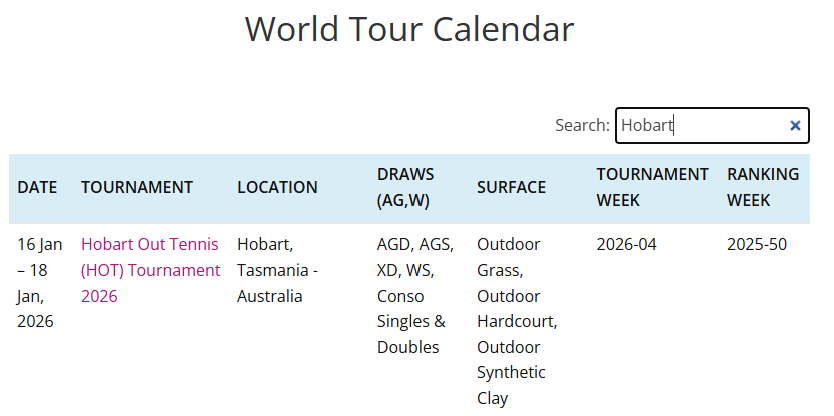
Your tournament ranking week is the week of the GLTA Tournament Entry Rankings snapshot that you should use to process the seedings for your tournament. In the past these details were sent to you. However, it can now be found on the GLTA World Tour Calendar. The format is YYYY-MM (i.e. 2025-50). You can import the rankings for this week into your tournament before adjusting player divisions and seeding players. See the section on importing rankings for how-to instructions.
Example Ranking Week:
Player Validation
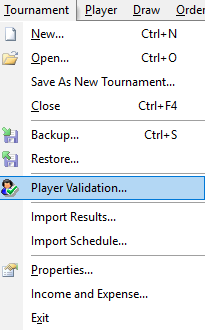
Player validation should be run every time you import new player entries. If you haven’t done so, please do so before seeding players or making draws. You can run player validation by clicking ‘Player Validation’ in the ‘Tournament’ menu. *note* when you run tournament validation it will reset any imported Tournament Entry Rankings. Sometimes it resets to the Championship Race Rankings. If you are making draws or seeding players, you should always re-import the Tournament Entry rankings after you run a ‘Player Validation.’
Player Ranking Adjustments
We’ve had some recent issues with new players playing at the wrong level and are asking directors to be keen to this and help us foster a culture of fairness with regards to rankings at your events. Please take the time to check the new or unranked players’ national rankings and be sure they are in the correct level. GLTA suggests using UTR, USTA, tennisrecord.com, and other national rankings websites.
Multiple Doubles / Singles / Mixed:
Players are not allowed to play in multiple Doubles, Singles, Mixed divisions in the same gender category. For example A player can not play in Any Gender A Singles and Any Gender B Singles. It is possible for a player to play in Women’s A Singles and Men’s C Singles as these are different gender categories. This is up to the director if they allow. However, GLTA restricts playing multiple levels across the same gender category in Singles, Doubles (and technically Mixed).
Division Gap Issues:
Players are not allowed to play in two events where the gap between divisions of the two events is more than 1 levels, unless they are playing up or have an established level in the lower event. In this case they can play a most a gap of 2 levels. For example, if a player is playing in AG Singles A. They can not play AG Doubles C, unless they have an established ranking of ‘C’ in AG Doubles. Note, if they have an ‘L’ ranking a discussion should be had with the ranking committee to determine their ‘established’ ranking.
Wrong Division:
Players are in the wrong division if their Tournament Entry ranking doesn’t match or if they don’t meet the division gaps rule above. In this case players are expected to know the rules. You can simply message the players and let them know that you are moving them to the correct division. If there are any questions, direct the players to the ranking committee.
Consolation Scores:
We’ve noticed a trend of directors not entering all consolation scores, even though they have the scores. If you can, please enter all consolation scores. Though, only the winner of the entire consolation draw gets the ranking points, the scores of other rounds impact the players win/loss history, their UTR, and helps them to remember who they played and how they played, among other benefits. So, if possible, please enter all consolation scores (except walkovers in early rounds). Walkovers before any matches has been played should be removed if using a custom draw. If using other draws, you aren’t able to remove those.
Seeding Players:
Seed singles players by GLTA Tournament Entry ranking. However, for doubles, you should seed teams by points. After seeding check for potential ties (where the total points between two teams are the same). If there is a tie, make note of the two teams and then switch to seed by ranking and see which team would be higher. Then switch back to seed by points and choose that team as the higher seed. The software doesn’t automatically break this tie. The idea here is that for doubles the seed by ranking is the tiebreaker. You must seed by points for doubles because if you seed by ranking, folks without a ranking or with a super low ranking will not get seeded higher when their partner has a lot of points (or when their average points is better than another team).
For seeding players, seed by 1, 2, 4, 8, 16 players only. The old practice of seeding by 1 seed for every 4 player is outdated. While we accept it if it’s already done. It can lead to an unbalanced draw. Use the following chart as guidance for the number of seeds.
| Num of players | Num of Seeds |
| 1-5 | 1 |
| 6-11 | 2 |
| 12-23 | 4 |
| 24-47 | 8 |
| 48-64 | 16 |
Score Format:
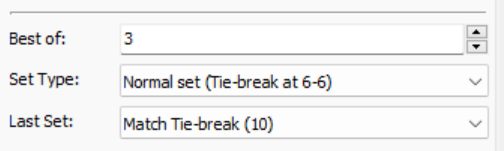
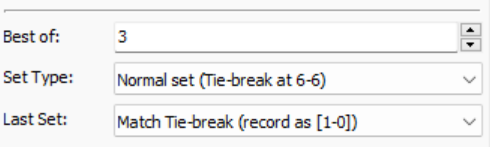
Please update the standard scoring to one of the following, especially if you intend to have round robin. The 3rd set shouldn’t count as 10 games. It should only count as one game.
Round Robin:
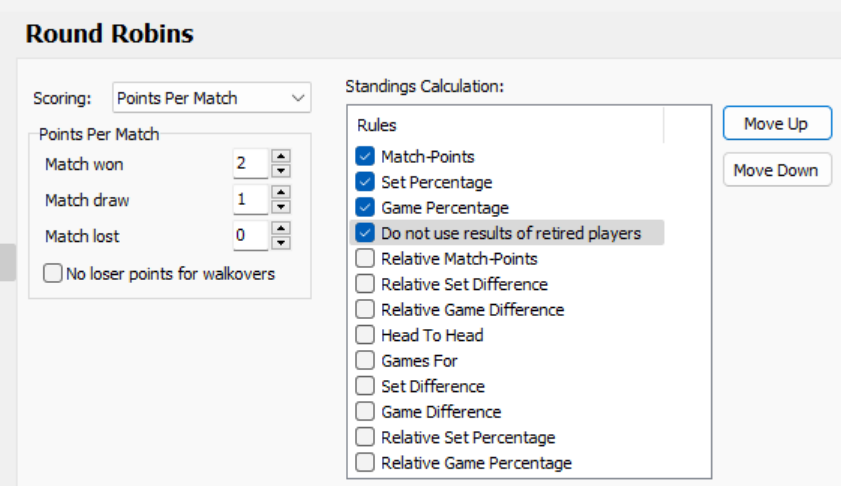
For round robin draws the default setting is not adequate and we suggest you use the following for determining winners. Head-to-head can also be used, but keep in mind it gets tricky when there are 3 players tied. If you used Head to Head, it’s recommended to use it as the 4th tiebreak (after Game Percentage).
Consolation Draw Option:
Note that when you create your draw, please avoid using the ‘First Match’ option for consolation. We’ve run into issues when using that option for consolation matches. One issue is that if players do not show up to play consolation, you won’t be able to set the draw per the players who arrive. It automatically sets the draw based on position. While this might be helpful, you won’t be able to adjust it and might have to force players to take a consolation loss for not showing up. In addition, if only two players show up for consolation and if they are on the same side of the main draw, you will not be able to put them in the finals’ slots on opposite sides of the consolation draw.
Instead, set the consolation option to ‘Custom’ and so that you can set the consolation draw based on the players who arrive. You should plan a method for how to place the players in the custom consolation draw so that you have a balanced draw. If you have 5 players and you place the first 4 on the top half then the 5th player will get a bye all the way to the finals.
Player Ratings Appeals Granted:
We will email you or send you a list of players who have been granted a waiver to play at a lower level for your tournament. If you have any questions about appeals granted, contact the rankings committee.
It is recommended to give appealed players the lowest seeding to avoid them clashing with the seeded players early on.
Seeding Appealed Players:
When you are seeding players, the players with appeals granted will likely have enough points to warrant seeding them as “numbered seeds.” However, going forward, please place these players as the lowest “numbered seeds” (even if they have higher points than the other players in the draw). We want to give “numbered seeds” to the players who meet the level requirements outright, first, and then reserve the lower “numbered seeds” for the players who have appealed. The 1st seed should always be assigned to a player of that level (without appeals). The last several “numbered seeds” should go to the appealed player(s) and the remaining middle “numbered seeds” should go to remaining highest ranked players of the level of the draw (without appeals). If there are multiple players with appeals in the same draw, then you should assign them the last several “numbered seeds” in order of their ranking, while guaranteeing the 1st seed is reserved for the highest ranked player that has not appealed. See examples below for further explanation.
For example…
If you have 1 B player with the appealed rating of C in the C draw and the C draw should have 4 “numbered seeds” (based on the number of players), then you should assign the appealed player as the 4th seed. The #1, #2, #3 seeds will go to those who are highest C players (without appeals).
If you have 2 Open players with appealed ratings of A in the A draw and the A draw should have 4 “numbered seeds,” then you should assign the appealed players as the #3 and #4 seed based on their ranking order. The #1 and #2 seeds will go to those who are the highest A players (without appeals).
If you have 1 C player with an appealed rating of D in the D draw and the D draw should only have 1 “numbered seed,” then you should assign this seed to a player who is the highest D player (without appeals). The appealed player will not be seeded and will follow the #1 seed.
Doubles Partners and First Match vs First Round:
We’ve noticed a trend of doubles partners are playing each other in the first match (if they both have a bye). The software is supposed to prevent them from playing in the first round. However, when two partners have a bye in their first round, they might end up playing in their first match. We want to avoid this as well. Please validate and make changes, as much as you can, to avoid having partners playing in their first match. If doubles partners reach out to your team in a reasonable time before the tournament, and ask that you fix this, please do so. If you have any questions, reach out to the ranking committee.
Importing the GLTA Tournament Entry Ranking into the Tennis Tournament Planner tool:
As a reminder, here is the information you will need to upload your rankings on your tournament planner:
If you have women playing in events that use the “men’s ranking,” which is used for Any Gender draws. Please change your draw event from ‘Any Gender’ to ‘Men’ before importing the ranking, as detailed below. The GLTA Tournament Entry ranking maintained on our Tournament Software vendor website is restricted to various long establish unchanging gender categories. GLTA uses Women’s Singles and Doubles rankings for women’s events and Men’s Singles and Doubles Categories for Men’s events. Women can have a ‘Men’s ranking’ which corresponds to their ranking for Any Gender draws. This ranking should be used and not their ‘Women’s Ranking’ when they play in AG draws. Forgetting to do this often results in a women who hasn’t played many AG events being seeded #1 in an AG draw.
Import Instructions:
- Click on the “Player” tab on the top of the screen
- Select “Import Ranking”
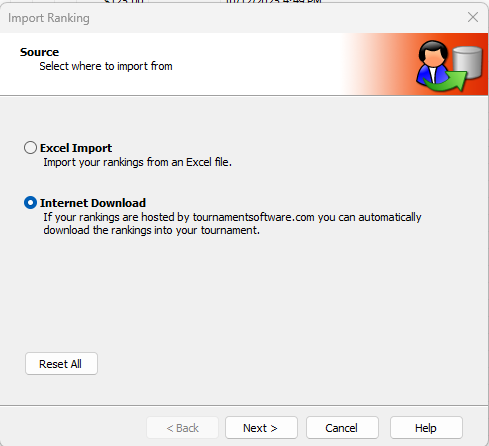
- A new screen will pop up. Select “Internet Download” and click on “Next”
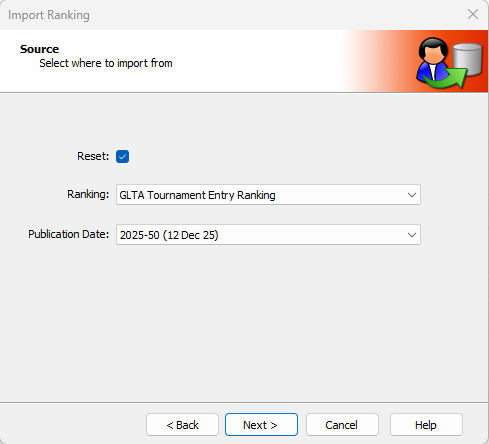
- on next screen leave “Reset” checked
*** VERY, VERY IMPORTANT ***
- SELECT in “Ranking” BOX: GLTA Tournament Entry Ranking
- SELECT in “Publication Date” BOX: <your tournament ranking week (see Ranking Week section for instructions to find this)>
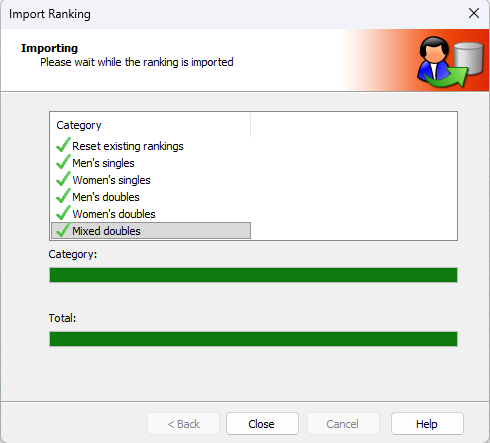
- then press “Next”, you will see the ranking points will then import on to your tournament planner
Current Ranking Thresholds:
The ranking thresholds are used as cut-offs for players in each category. For example if a player Lion Heart has a ranking of 4250 in singles. They should play B singles (or higher. if they choose).
| Division | Maximum Rating |
| OPEN | N/A |
| A, 40+A | 42500 |
| B, 40+B | 4250 |
| C, 40+C | 425 |
| D, 40+D | 35 |
UTR Guidance:
This UTR chart can be used as a approximate guide to identify levels for new players. For existing players, we rely more on the GLTA TE Ranking. However, if the player has an ‘L’ ranking or if the director has any questions about the players level and reaches out to us, we also use UTR. Note UTR is new and is still working through their regional calculations. We’ve seen some discrepancies UTR ratings are not always 100%, in those case we have to analyze the UTR history to better understand the UTR. For any questions with using UTR, please contact the rankings committee.
| GLTA | UTR (100% reliable UTRs) |
| Open | 7.0+ |
| A | 5.5 – 7.0 |
| B | 4.0 – 5.5 |
| C | 2.5 – 4.0 |
| D | 1.0 – 2.5 |
Any further questions, contact the rankings committee at rankings